> For the complete documentation index, see [llms.txt](https://anymind-group.gitbook.io/english-1/llms.txt). Markdown versions of documentation pages are available by appending `.md` to page URLs; this page is available as [Markdown](https://anymind-group.gitbook.io/english-1/faq/kyanpn/mkettopureisu/can-my-influencers-join-campaigns-without-connecting-their-social-accounts.md).
# Can my influencers join campaigns without connecting their social accounts?
Yes! Influencers can now join eligible Marketplace campaigns **without connecting their social media (SNS) accounts** on AnyCreator.
### 1. Overview
Influencers are encouraged to connect their social media (SNS) accounts to AnyTag for automated eligibility checks and performance tracking. However, for eligible campaigns, influencers may participate **without connecting their SNS accounts** by submitting public profile and post links.
This approach:
* Reduces technical friction during application
* Expands the available influencer pool
* Still supports campaign tracking and payment
SNS connection remains recommended, but is **not mandatory** for eligible campaigns.
### 2. How the Application Flow Works?
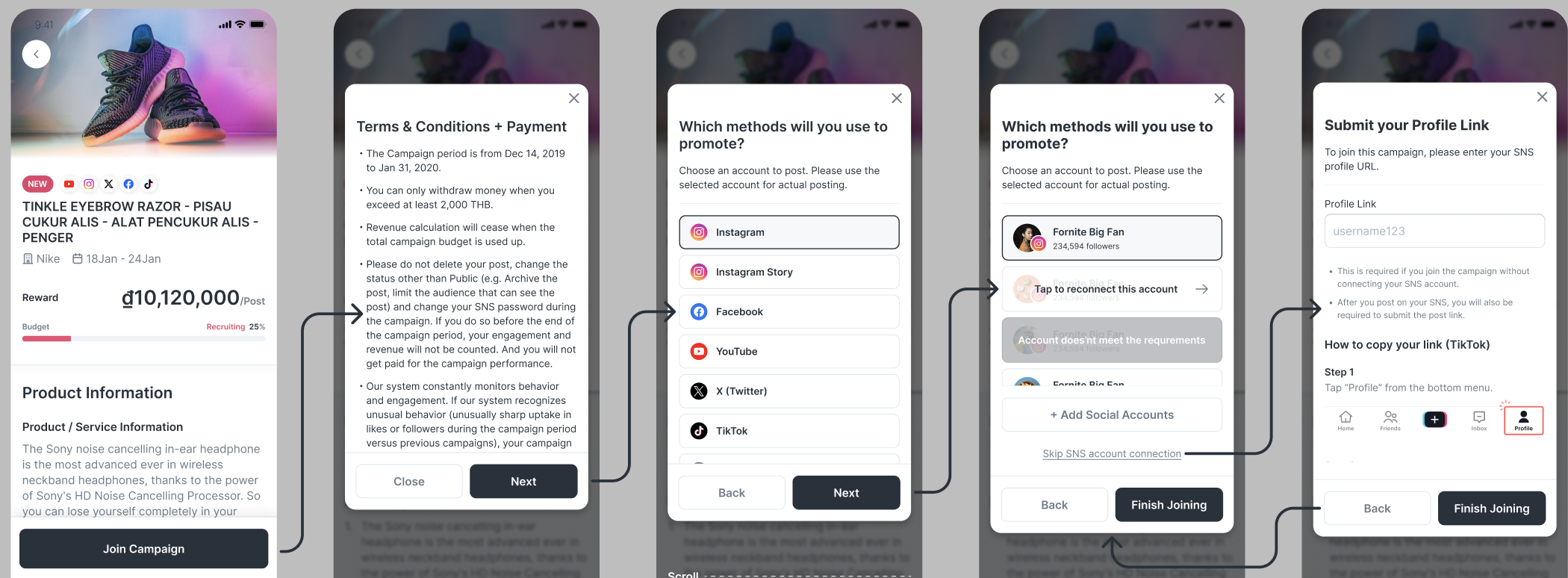
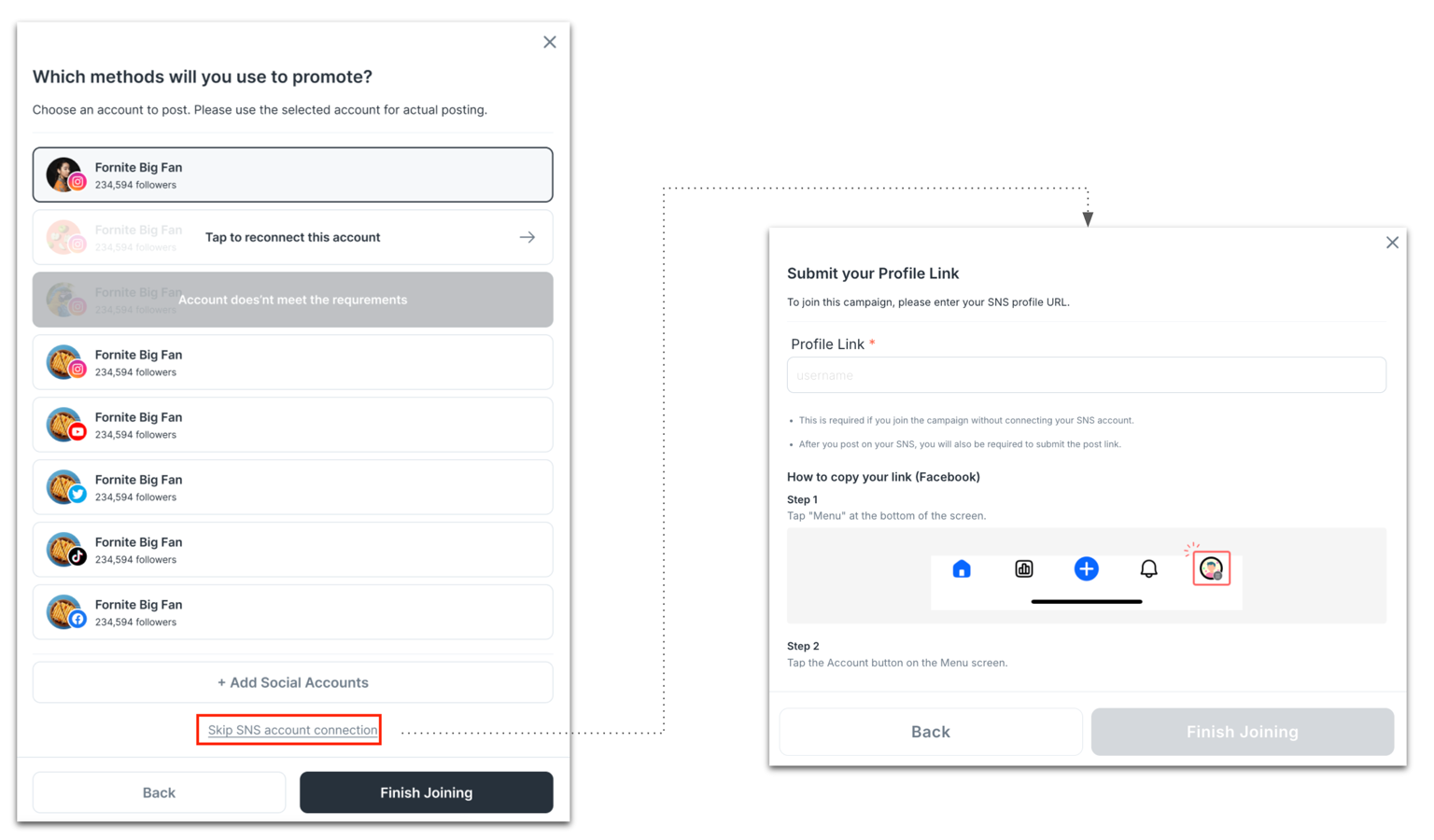
#### Step 1: Influencer applies to the campaign with skipping SNS account connection
When an influencer applies without connecting an SNS account:
* The influencer submits a **public SNS profile link**
* The system performs **automatic initial eligibility checks** using publicly available data
AnyTag system will then:
* Internally register the submitted profile as a non-signup account on AnyTag
* Fetch publicly available metrics (such as follower count and engagement)
#### Step 2: Application Review & Approval
For influencers who do not connect SNS:
* Applications that do not meet minimum requirements may be **automatically** rejected
* Other applications require **manual review** by the campaign owner or internal team.
{% hint style="info" %}
You can review and approve influencer applications in **Applicant Influencers** tab.
{% endhint %}
### 3. Posting & Submission Requirements
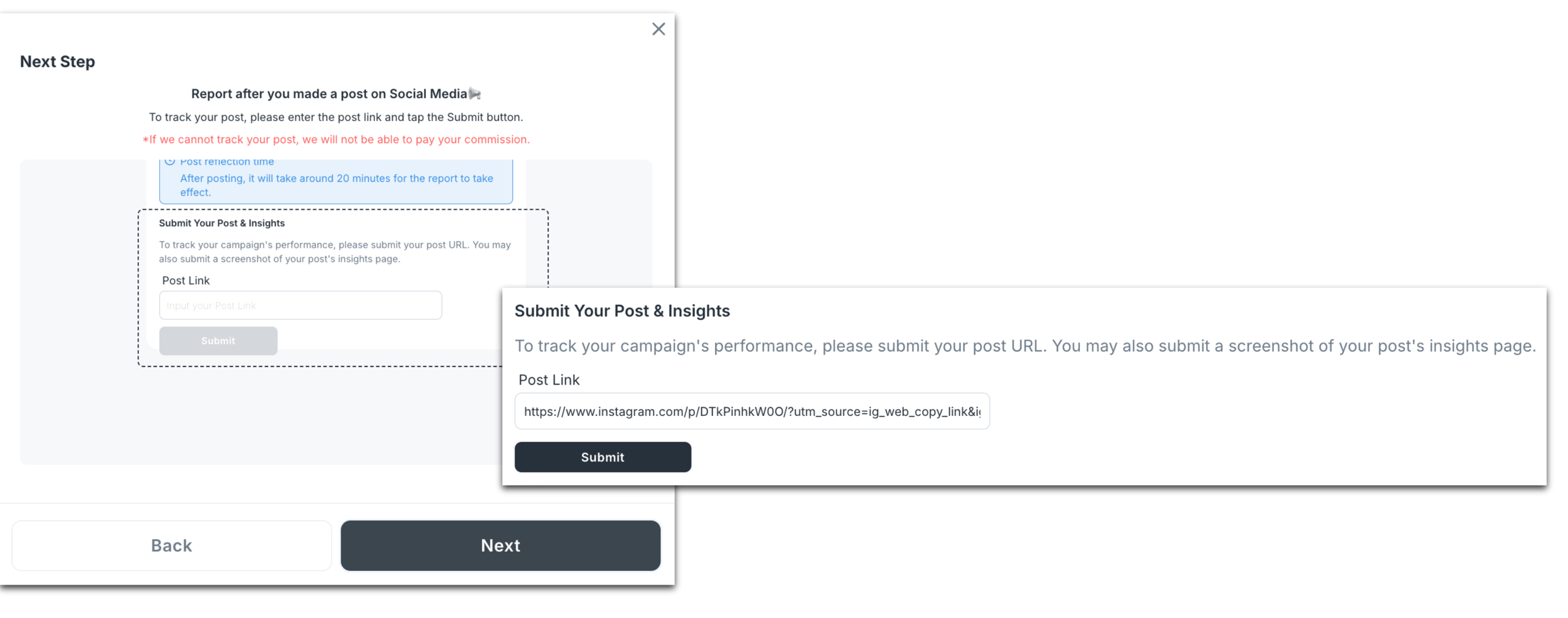
Once approved, influencers follow the standard campaign execution flow with one key difference: **manual post URL submission is required**.
* Influencers publish content on the social platform within the campaign period
* Influencers must manually submit the **post link** via **AnyCreator** application.
### 4. Performance Tracking & Reporting
Even without SNS connection:
* Submitted post links are verified by the system
* Performance data is collected via scraping or available APIs
* Metrics are refreshed up to **4 times per day**
{% hint style="info" %}
Tracking accuracy depends on post visibility and platform limitations.
{% endhint %}
### 5. When Are Screenshots Required?
By default, influencers only need to submit a **post link**.
Screenshots are required for **view-based campaigns** on platforms where views cannot be reliably fetched automatically.
#### \* Supported Platforms & Metrics Tracking
This section explains which metrics can be tracked automatically and when **manual screenshot submission** is required.
#### **Facebook**
| Metric | Tracking Method |
| ----------------- | ----------------------- |
| Cost per posting | No API required |
| Cost per reaction | Automatically fetched |
| Cost per share | Automatically fetched |
| Cost per comment | Automatically fetched |
| Cost per view | **Screenshot required** |
#### **Instagram (Feed / Reels)**
| Metric | Tracking Method |
| ---------------- | --------------------- |
| Cost per posting | No API required |
| Cost per like | Automatically fetched |
| Cost per view | Automatically fetched |
| Cost per comment | Automatically fetched |
#### **Instagram Story**
| Metric | Tracking Method |
| ---------------- | ----------------------- |
| Cost per posting | No API required |
| Cost per comment | Automatically fetched |
| Cost per view | **Screenshot required** |
#### **YouTube**
| Metric | Tracking Method |
| ---------------- | --------------------- |
| Cost per posting | No API required |
| Cost per like | Automatically fetched |
| Cost per view | Automatically fetched |
| Cost per share | Automatically fetched |
| Cost per comment | Automatically fetched |
#### **X (Twitter)**
| Metric | Tracking Method |
| ---------------- | ----------------------- |
| Cost per posting | No API required |
| Cost per like | Automatically fetched |
| Cost per share | Automatically fetched |
| Cost per comment | Automatically fetched |
| Cost per view | **Screenshot required** |
#### **TikTok**
| Metric | Tracking Method |
| ---------------- | --------------------- |
| Cost per posting | No API required |
| Cost per like | Automatically fetched |
| Cost per view | Automatically fetched |
| Cost per share | Automatically fetched |
| Cost per comment | Automatically fetched |