> For the complete documentation index, see [llms.txt](https://anymind-group.gitbook.io/english-1/llms.txt). Markdown versions of documentation pages are available by appending `.md` to page URLs; this page is available as [Markdown](https://anymind-group.gitbook.io/english-1/more-tools/social-media-data-fetcher/facebook-instagram-post-fetcher.md).
# Facebook/Instagram Post Fetcher
## What's Facebook/Instagram Post Fetcher?
**FB/IG Post Fetcher by Keyword/Hashtag** is a powerful Google Sheets add-on that automatically retrieves Facebook and Instagram post data based on your keywords or hashtags. It pulls **post links, captions, dates, posts' engagement data** directly into your Google Sheet or CSV, saving time and streamlining your workflow.
With this tool, your business team can quickly research **organic content**, enabling you to:
* **Accelerate market analysis** by accessing relevant posts in minutes
* **Spot emerging trends** before they go mainstream
* **Identify valuable content** to support proposals and campaign strategies
## Step-By-Step Instructions
### 1. Install Social Media Data Fetcher
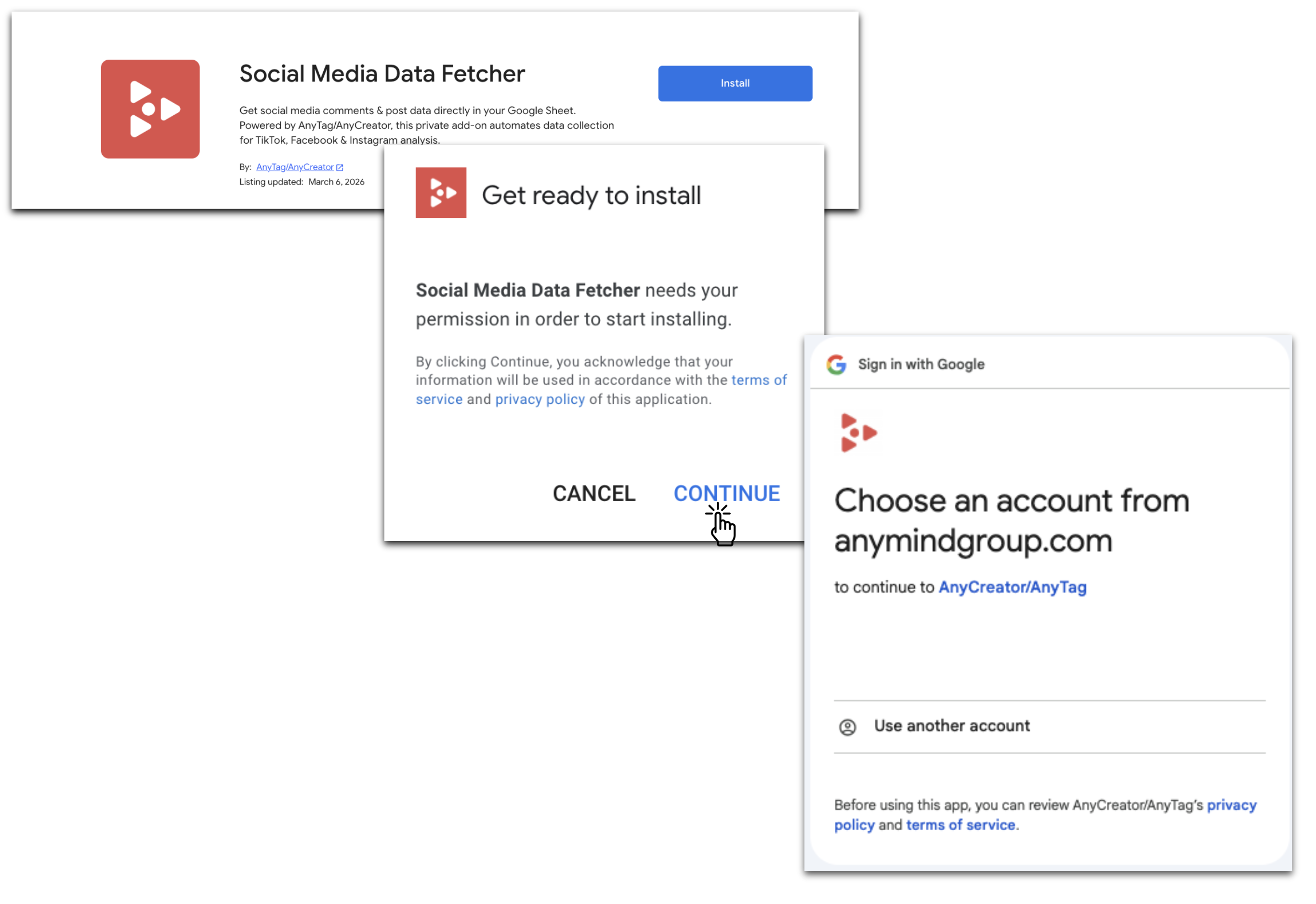
* Go to the [**Google Workspace Marketplace**](https://workspace.google.com/marketplace)**,** search and install Social Media Data Fetcher for your Google account.
* Or directly install via [this provided URL](https://workspace.google.com/marketplace/app/tiktok_comment_fetcher/945076258427).
### 2. User Workflow
#### Step 1: **Prepare the Google Sheet**
* Open a new or existing Google Sheet.
* In the active tab, enter your search parameters:
* **Cell A2:** Keyword
* **Cell B2:** Post Type
* **Cell C2:** Start Date
* **Cell D2:** End Date
* Cell E2: Choose Search by ***Keyword*** or ***Hashtag***
* Template: [\[Template\] Facebook/Instagram Post Fetcher by Keywords](https://docs.google.com/spreadsheets/d/15WmWNm8tfMj2RjbAEqCU1aUrGmGLHNLcTwT3xbp2-Hw/edit?usp=sharing)
#### Step 2: Run the Add-on
* Activate the **FB/IG Post Fetcher** via the Add-on button
* Select IG Posts or FB Posts
* Select **"Start Fetching Comments"**
{% hint style="info" icon="comment-check" %}
You can add
{% endhint %}
#### **Step 3: Authorize Access**
* A prompt will guide you to grant access.
* Copy **sheet-manager email address** and **share** your sheet with that email as **Editor** permission.
#### **Step 4: Fetch Comments**
* Return to the sheet and click **"Check again"** (to confirm permission setup).
* Then click **"Start fetching comment"** once more to initiate the process.
#### **Step 5: Wait for Results**
* The add-on will process your request. Once data is ready:
* Retrieved data includes:
* **Post URL**
* **Post Caption**
* **Post Date**
* **Post Engagement data** *(Like, Comment, Video plays count, Video views Counts)*
* The results for **each keyword** will be written to your original Google Sheet in a **new tab**. The tab will be named using the following format:\
**Result\_of\_\[SheetName]\_\[Keyword]*****\_*****\[KeywordOrder]\_\[YYYYMMDD\_...]**
**Example:**\
If the task is executed on **Sheet1**, the results will appear in a tab named:\
**Result\_of\_Sheet1\_iphone\_1\_20260306\_061505**
* The original tab name **does not change.**
{% hint style="success" %}
#### **Tab Handling & Multiple Executions**
* The add-on executes on the **tab you have selected**.
* You can run **multiple executions** in the same Google Sheet using different tabs at the same time to maximize your workload efficiency.
{% endhint %}
{% hint style="danger" %}
#### Limitation & Error Handling
* You can submit **up to 30 keywords/hashtags per execution,** with a **maximum of 300 posts** retrieved per run.
* If the API returns an error or the keyword yields no matching results, an **in-sheet notification** will appear:
*Example:* `"No posts found for this keyword"`
{% endhint %}
{% hint style="info" %}
The fetching process typically takes around **15–20 minutes**, depending on system workload, the number of posts within the selected time range, and time zone differences.
{% endhint %}
### **🎥 Visual Walkthrough:**
For a clear visual demonstration, watch the **Instagram/Facebook Post Fetcher by Keywords/Hashtabs visual walkthrough video** below:
{% embed url="" %}